R-n-D and University World Comparison
【按】图是真的。文字皆由 AI 生成。
引言:科技地缘格局的宏观与微观投影
当今全球科技格局与知识生产版图正经历二战以来最为剧烈的重塑。观察这种时代 尺度的地缘迁移,通常需要锚定两个互为因果的坐标维度:
- 宏观资本要素的投入强度(Capital Input):全社会研发经费(R&D Expenditure)的总量、增长斜率与经济体量占比,代表国家在创新底座与技术 转化维度的战略资源倾斜;
- 微观学术机构的产出位次(Institutional Standing):全球大学排名体系 中高等院校的相对升降与集聚分布,映射出微观主体在学术声誉、论文发表与前 沿探索中的综合竞争态势。
近期公开的两组量化数据——OECD 统计的全球主要经济体 R&D 支出演变曲线,以及 泰晤士高等教育(THE)2011–2026 年版中日高校排名迁徙图——恰好构成了宏观资 本输入与微观机构生态变迁的极佳对照样本。
一、 宏观研发资本投入:中美欧的大分流与反超
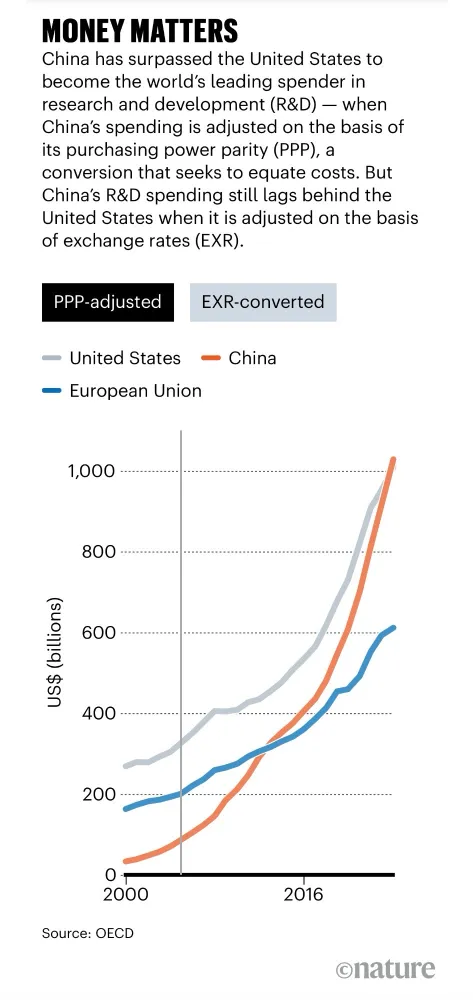
 图 1:全球主要经济体全社会研发支出(R&D spending)走势。灰色为美国,
橙色为中国,蓝色为欧盟。数据源自 OECD,由《Nature》整理发布。
图 1:全球主要经济体全社会研发支出(R&D spending)走势。灰色为美国,
橙色为中国,蓝色为欧盟。数据源自 OECD,由《Nature》整理发布。
图 1 展现了 2000 年至 2024 年前后中美欧三方全社会研发总支出的宏观演进轨 迹,其中揭示的核心事实与统计逻辑尤为关键:
- 测算口径的政治经济学:PPP 与 EXR 的张力
- 购买力平价口径(PPP-adjusted):在剔除汇率波动与本土物价差异 后,中国研发总支出已在近期正式超越美国,突破 10,000 亿美元(1 万亿 美元)门槛,跃居全球第一。这一测算反映了发展中国家在科研人员人力成 本、实验室空间建设及本土常规耗材采买方面的显著规模购买力红利。
- 市场汇率折算口径(EXR-converted):若按实际汇率换算,中国研发支 出仍显著落后于美国。这一结构性差异意味着,在依赖全球统一标价的硬通 货领域——如尖端仪器采购、核心知识产权引进及全球高端人才竞聘——美国仍 保有坚实的资本与财务护城河。
- 三方梯队的动态大分流
- 中国(指数级陡峭追赶):2000 年时中国全社会 R&D 尚不足 500 亿美 元;历经二十余年持续的高斜率爬坡,于 2014 年前后在 PPP 维度超越欧 盟,并于近两年跨过万亿美元大关,形成与美国齐头并进的双寡头格局。
- 美国(高基数下的稳步扩张):自 2000 年约 2,800 亿美元起步,呈现 稳健的复合增长;在近年地缘科技竞争驱动下,研发经费增速再度提振,同 样跨入万亿美元梯队,展现出极强的科技资本韧性。
- 欧盟(增长平缓与结构性滞胀):从 2000 年约 1,800 亿美元稳步增至 约 6,000 亿美元。自 2014 年被中国在 PPP 维度超越后,不仅无力缩小差 距,反而与中美两强的绝对距离被持续拉大,反映出欧洲一体化框架下面临 的财政碎片化与增长动能趋缓。
二、 微观学术机构生态:中日高校 THE 排名的结构性逆转
宏观研发资本的持续注入,必然会经由重大专项基金、科研基础设施与学者引育机 制,在高等院校这一知识创新高地沉淀发酵。图 2 记录了 2011 至 2026 年版泰 晤士高等教育(THE)世界大学排名中,中国内地与日本全部上榜高校的名次变 迁。
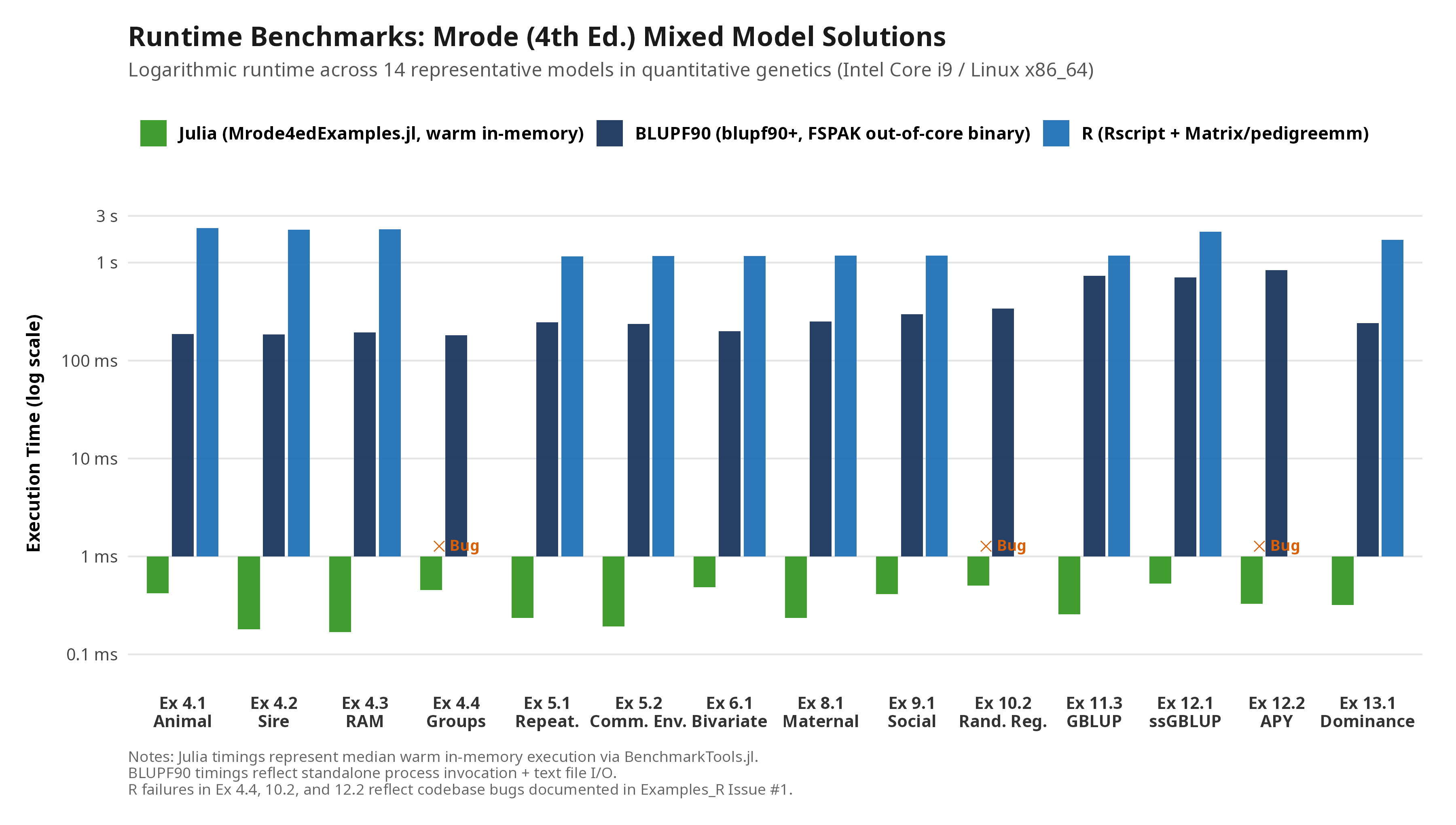
Benchmarking Solutions to Mrode (4th Ed.): BLUPF90, R, and Julia
The publication of the 4th edition of Linear Models for the Prediction of the Genetic Merit of Animals by R. A. Mrode and I. Pocrnic (2023, CABI) provides a comprehensive pedagogical reference for linear mixed models in quantitative genetics and animal breeding. Accompanying the text are three open-source companion solution repositories implementing the worked examples across the textbook:
- BLUPF90 Suite (
Examples_BLUPF90): Parameter and data setups for the legacy Fortran 90 binaries developed by Ignacy Misztal and colleagues at the University of Georgia. - R Scripts (
Examples_R): Educational scripts using standard R packages (Matrix,pedigreemm,lme4, and thetidyverse). - Julia Package (
Mrode4edExamples.jl/Examples-Julia): A native, type-stable implementation built on the domain-specific librariesRelationshipMatrices.jlandBreeding.jl.
Below is an empirical benchmark and architectural evaluation comparing the computational paradigms, execution performance, numerical reliability, and algorithmic scaling of these three solution suites.
一个华为 TECH4ALL 标杆项目
一、 背景与生态冲突
- 入侵物种:粉红鲑 / 驼背鲑(Oncorhynchus gorbuscha,英文俗称 Pink salmon 或 Humpback salmon)。
- 原产于北太平洋,20世纪50年代由苏联人为引入科拉半岛等巴伦支海沿岸,随后向西快速蔓延至挪威北部河流。
- 遗传与生活史特征:严格的 2年固定生命周期,在北挪威呈现极强的奇数年份大爆发规律(如2017、2019、2021、2023年大爆发)。
- 保护目标:本土野生的大西洋鲑(Salmo salar)及北极红点鲑(Salvelinus alpinus)。
- 生态危害:
- 生态位与产卵床抢占:粉红鲑繁殖期与大西洋鲑重叠,具有强烈的领域攻击性,挤占产卵浅滩;
- 水体腐败与生化污染:太平洋鲑属(Oncorhynchus)产卵后会发生群体性死亡(semelparity),数以万计的死鱼腐烂造成河道富营养化、缺氧并恶化幼鱼水质;
- 病原与寄生虫传播:增加本土鱼类感染海虱和病原菌的风险。
二、 地点与合作方
- 具体位置:挪威最东北端的芬马克郡(Finnmark)贝勒沃格(Berlevåg)。主要部署在当地关键的产卵河流:
- 斯图雷尔瓦河(Storelva)
- 孔斯峡湾河(Kongsfjordelva)
- 主要合作方:
- 华为(TECH4ALL 团队,提供 AI 算法底座、边缘算力与光伏微电网支持)
- 贝勒沃格当地狩猎与垂钓协会 BJFF(Berlevåg Jeger- og Fiskerforening,本地生态保护主力)
- 挪威数字化咨询与软件开发机构 Simula Consulting
- 机械自动化设备商 Troll Systems
三、 项目时间线
- 2020 – 2021 年(立项与研发):BJFF 与华为、Simula 达成合作,针对水下浑浊水流环境设计机器视觉方案,并在 Storelva 进行水下相机数据采集与算法训练。
- 2022 年 6 月(首次部署):在 Storelva 河流部署了全球首个全自动水下 AI 机械分选阻截系统原型,验证图像识别与机械导流的可行性。
- 2023 年夏季(实战大考):正值两年一度的粉红鲑洄游爆发大年,系统完成算法与机械升级,并扩展部署至 Kongsfjordelva 等河流,进入高负荷连续阻截实战。
四、 核心技术与工作原理
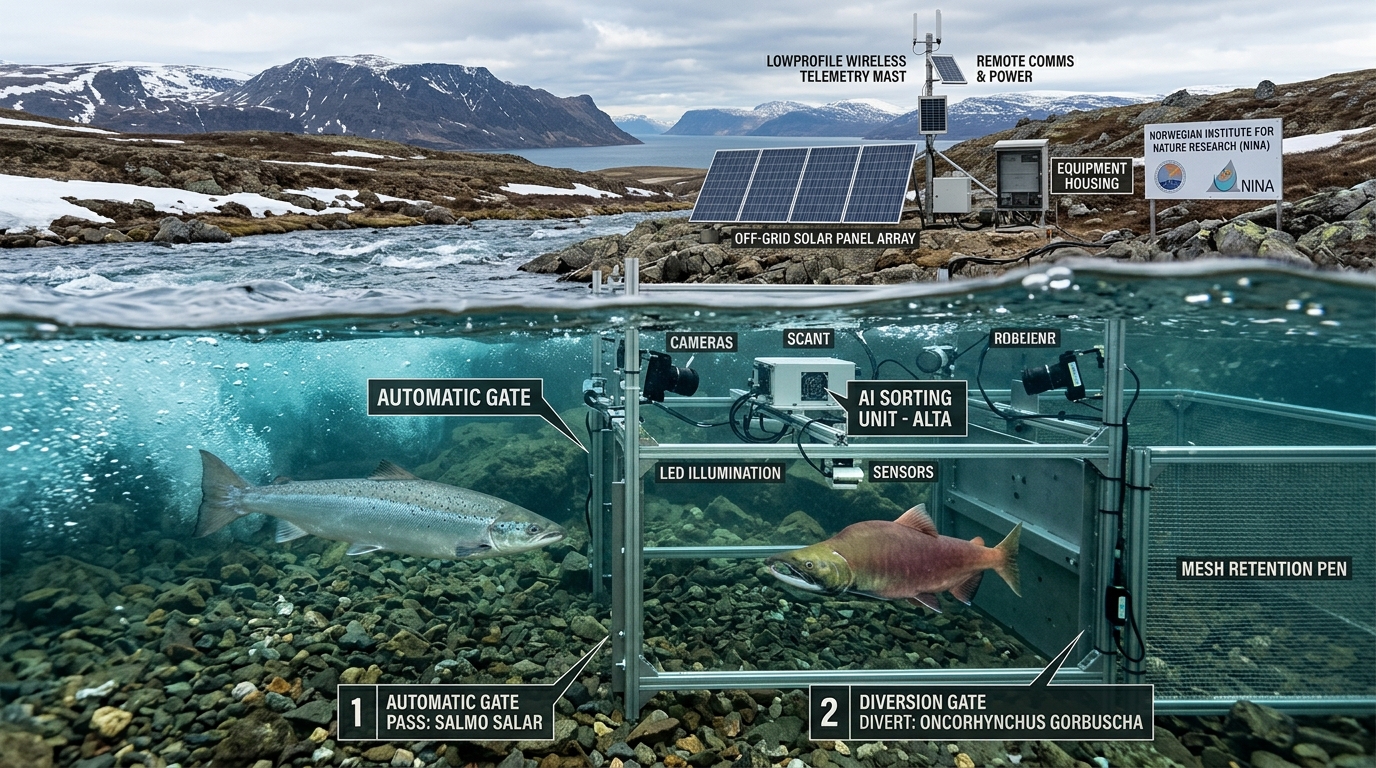
- 河道物理导流网:在河道横设水下栅栏,将逆流而上的所有鱼群导流至一个特制的窄通道。
- 水下机器视觉与边缘 AI:
- 高速水下摄像头持续拍摄鱼类游过的特征部位(吻部形态、背部特征如雄性特有的驼峰、体表黑斑分布等)。
- 基于边缘计算硬件实时完成物种推理分类,时延在毫秒级。
- 自动化物理分流门:
- 识别为本土物种(大西洋鲑、红点鲑):闸门向上游敞开,鱼群无应激、不受阻碍地继续向上游洄游产卵;
- 识别为入侵粉红鲑:闸门迅速切换,将鱼导流至专门的集鱼舱(holding tank),随后由 BJFF 志愿者集中捞出处理(用于堆肥或消费加工)。
- 野外离网供电:偏远极北地区缺乏电网,系统由集成的智能光伏(PV)与储能微电网持续供电,并通过无线网络远程传输监测数据。
 图 1:河道水下 AI 自动化分选过滤系统剖面示意图。本土野生大西洋鲑(Salmo salar)由左侧开放闸门无害通过,继续向上游洄游;入侵驼背鲑(Oncorhynchus gorbuscha)经
水下边缘视觉识别后被分流挡板导向右侧收集舱;岸边由智能光伏微电网与无线遥测系统支持离网运行。
图 1:河道水下 AI 自动化分选过滤系统剖面示意图。本土野生大西洋鲑(Salmo salar)由左侧开放闸门无害通过,继续向上游洄游;入侵驼背鲑(Oncorhynchus gorbuscha)经
水下边缘视觉识别后被分流挡板导向右侧收集舱;岸边由智能光伏微电网与无线遥测系统支持离网运行。